Integration Guide ABB (IRC5)
Note: It is strongly recommended to read the Robot communication overview prior to this integration guide.
Note 2: It is strongly recommended to use the latest version of the integration guide included in the latest available version of the robot module. To download the robot module, please visit the official Photoneo website.
Contents
1 Prerequisites
The Robot module is compatible with RobotWareOS versions 5.13 and higher.
In addition to compatible system version, the following conditions must also be met:
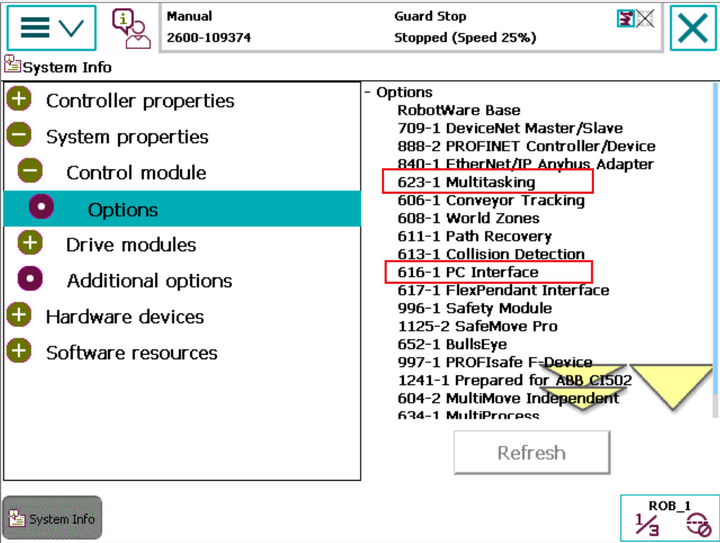
(616-1) PC Interface Module available
(623-1) Multitasking Module available
2 Robot controller setup
This guide was originally written using the RobotWare v.6.06, however, it should be compatible with older versions with minor changes.
2.1 Controller configuration
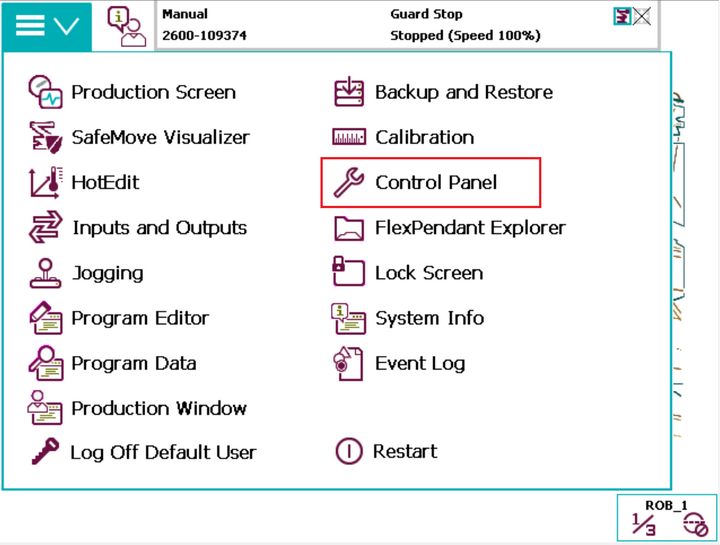
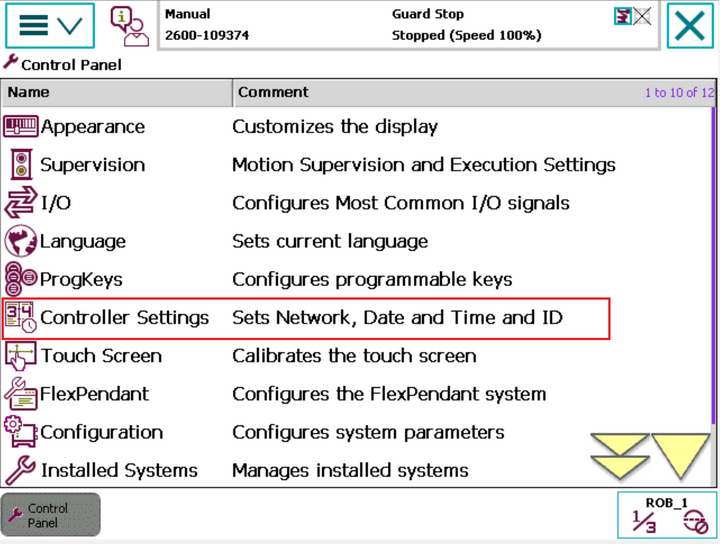
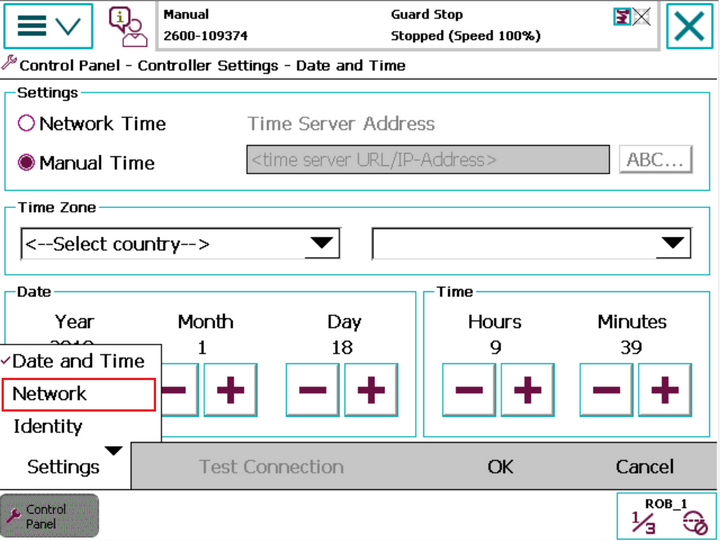
2.1.1 Network configuration
Note: The network configuration procedure described below only works with RobotWareOS v.6 or higher. If you have an older version of RobotWareOS and need to change an IP address, please contact local ABB support.
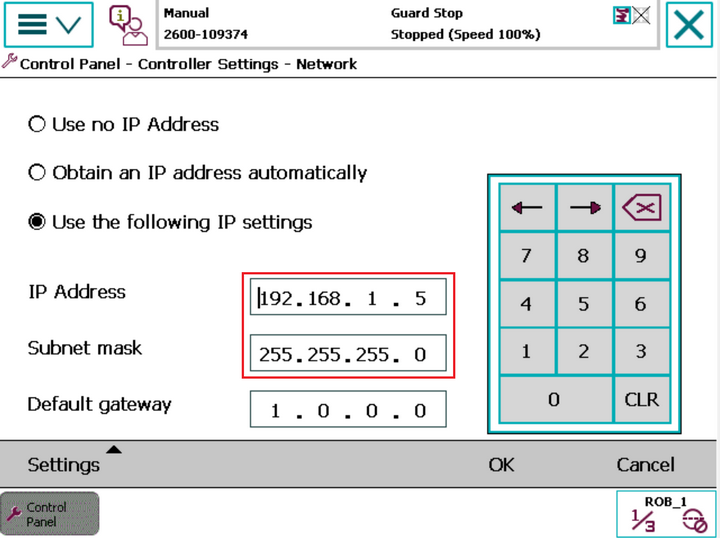
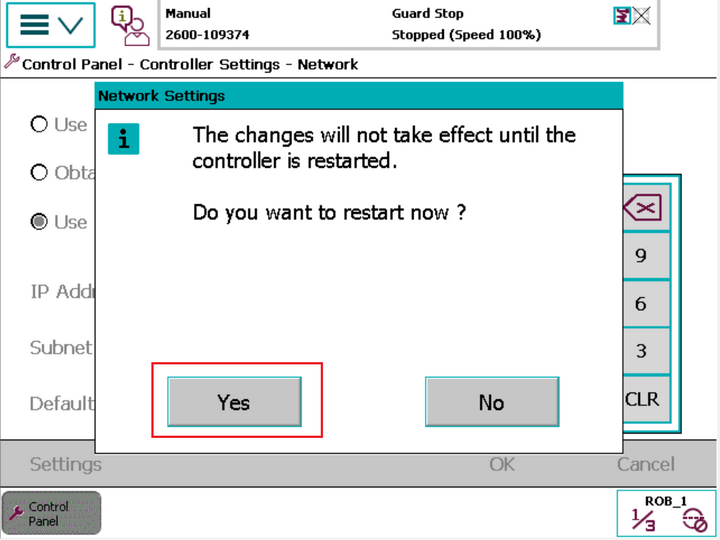
2.2 Robot module installation
2.2.1 Loading the Robot module files
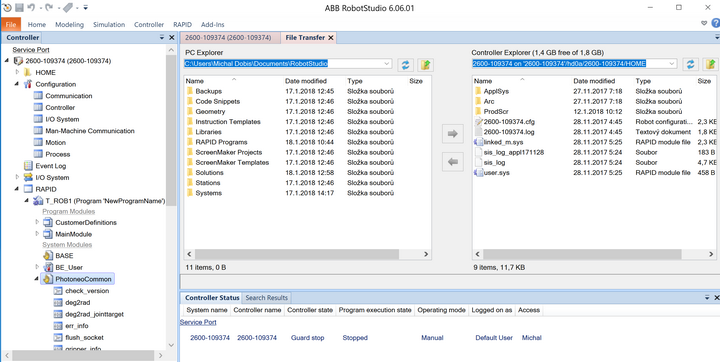
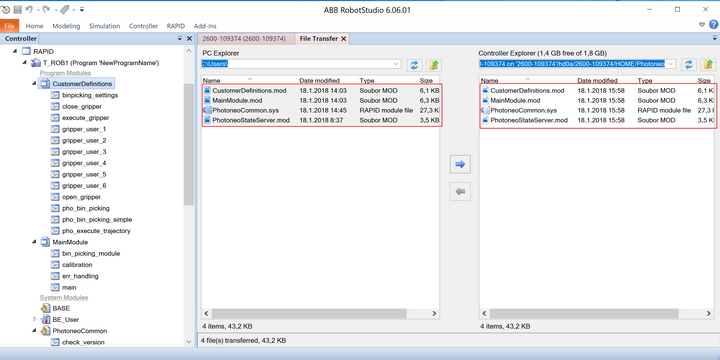
The Robot module files need to be transferred to the robot controller - you can use either a USB stick or transfer via the Robot Studio (more convenient method described below).
Set your local PC network settings to DHCP and link it with the IRC5 controller using an Ethernet cable. Use the Service Port of the robot controller. Then launch the Robot Studio.
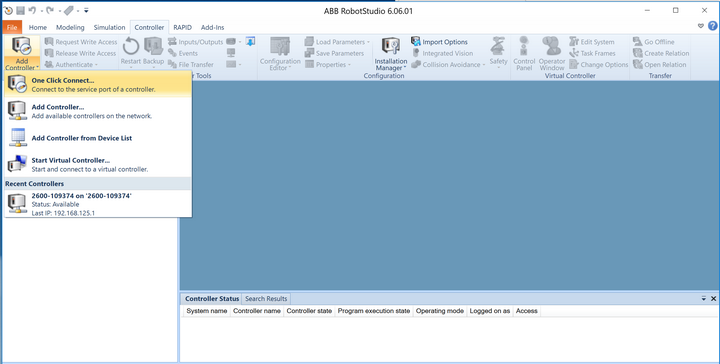
CustomerDefinitions.mod
PhotoneoStateServer.mod
PhotoneoCommon.sys
Besides that Photoneo provides three example bin picking programs and a semi-automatic calibration example program located in folder example_programs:
MainBasic.mod
MainMultipleVisionSystems.mod
MainChangeSolution.mod
Calibration.mod
The core files (and optionally the example program you wish to use) need to be transferred to the HOME:/Photoneo/ folder created within the Robot Controller file system as is shown in the figure below:
2.2.2 Creating the Robot state server task
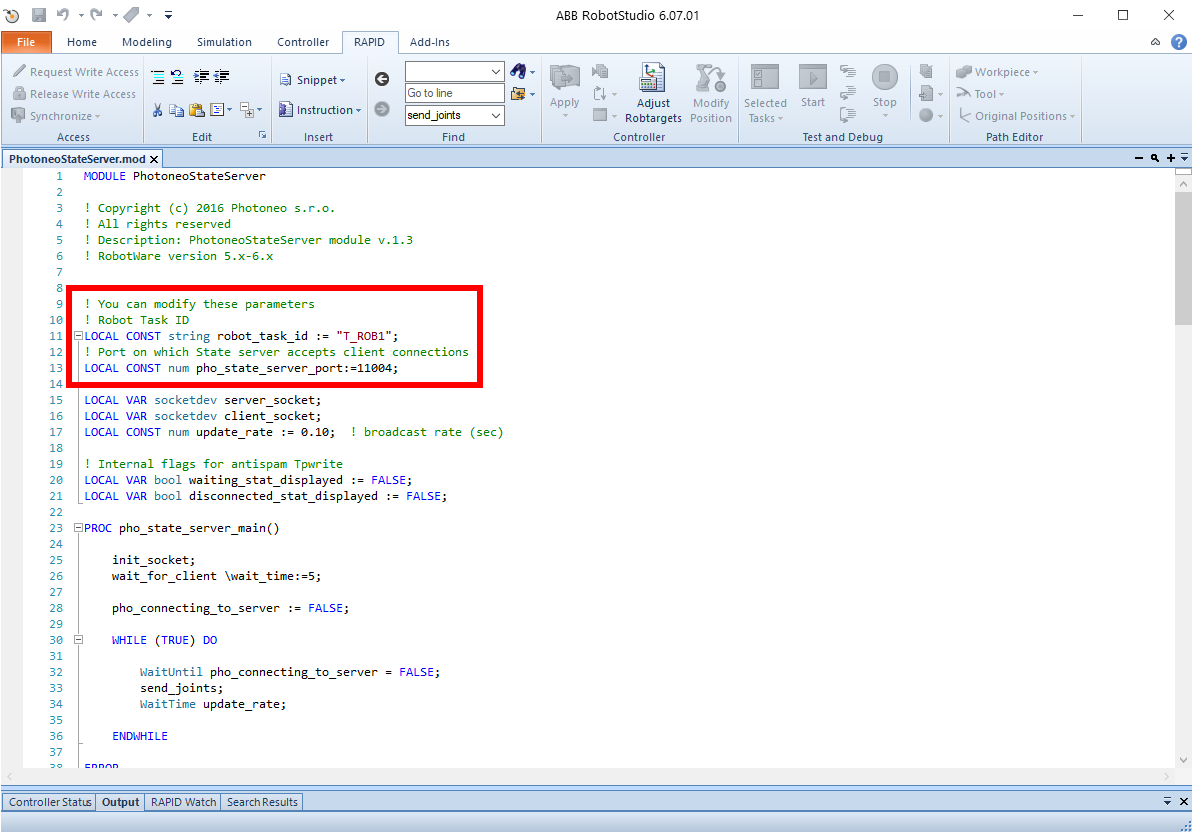

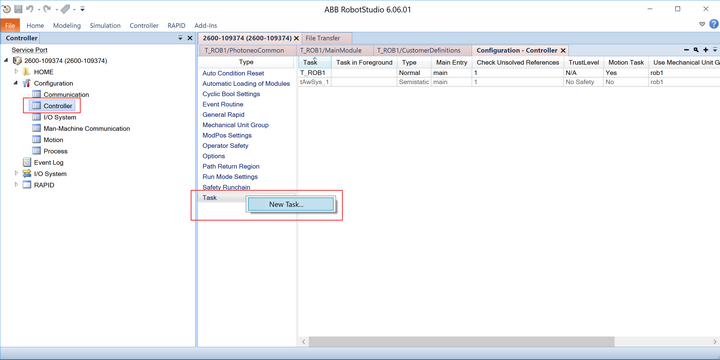
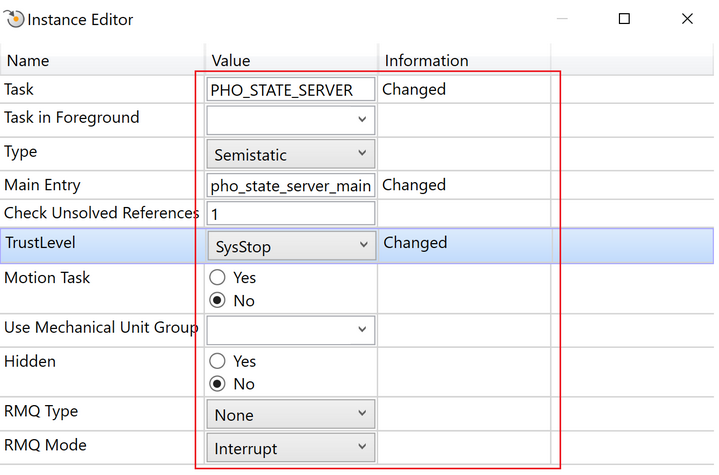
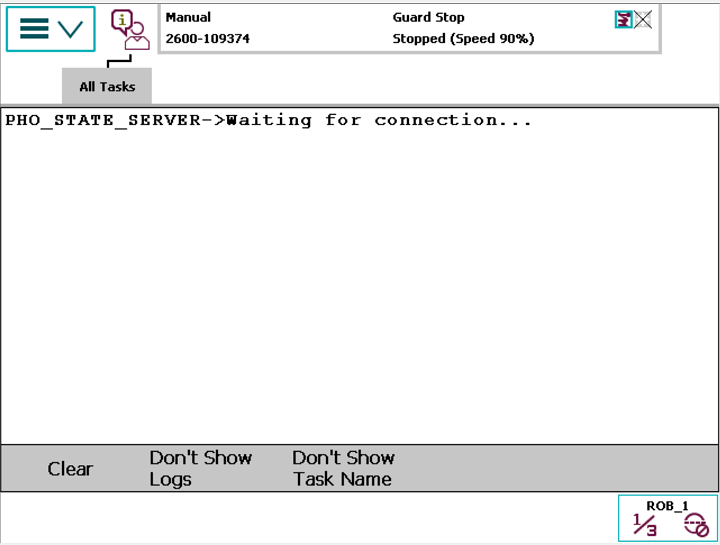
2.2.3 Automatic loading of modules
Now we need to configure the ABB system to automatically load StateServer.mod during the boot.
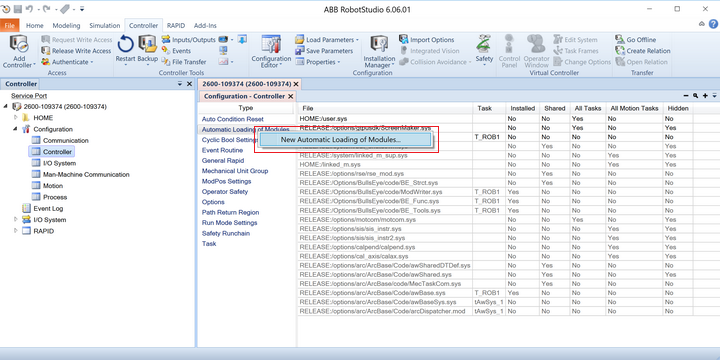
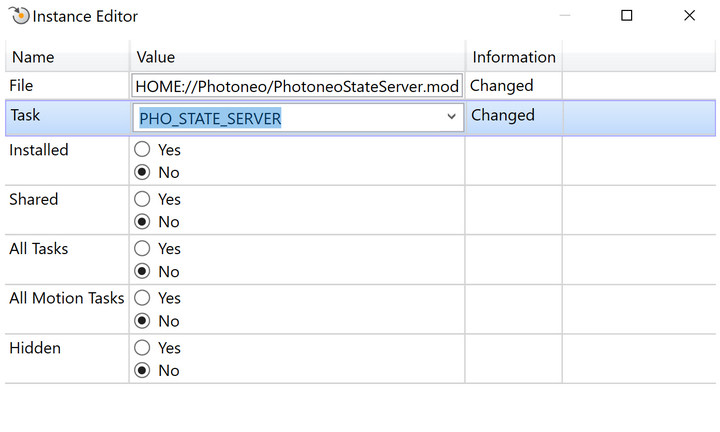

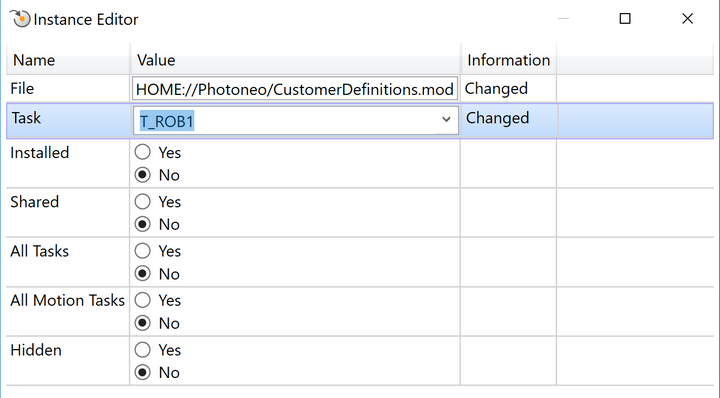
2.2.4 Loading the example program
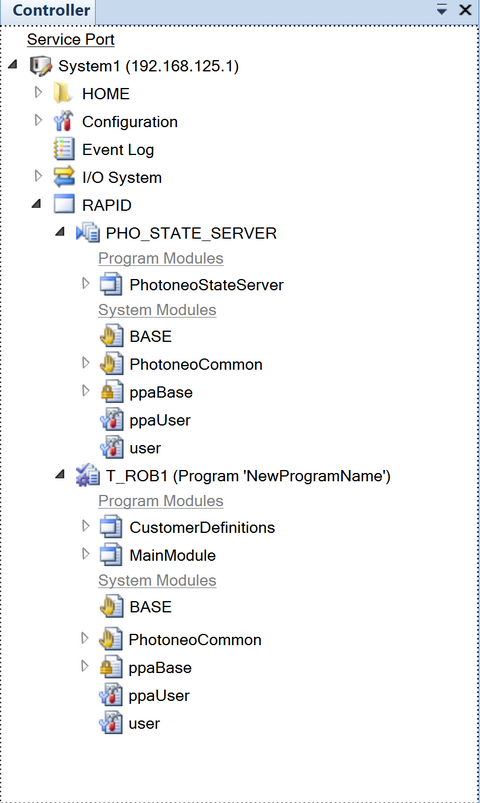
We are now ready to manually load one of the example programs to T_ROB1 task. You can load the example program from your PC or directly from the robot controller.

3 Robot module
The Robot module is designed to be easily integrated into existing applications written in RAPID language.
3.1 Robotic API
Note: It is strongly recommended to read the Photoneo robotic API prior to this section.
3.1.1 Connection procedures
Warning: These procedures are contained in the PhotoneoCommon.sys API section and must not be edited!
Connection procedure |
Description / Usage |
|---|---|
Connect to Action Request Server
pho_wait_for_server(string server_ip,\num port_number,\num wait_time,\switch sys_stop | switch sys_restart) |
Description
Function to establish a new connection to the Action Request Server.
Input parameters:
Usage
The procedure should be called only once at the beginning of the program. Only after the connection has been established it is possible to send requests.
pho_wait_for_server "192.168.1.6", \wait_time:=20, \sys_restart;
|
3.1.2 Communication procedures
Note: Please read Action requests for detailed documentation of these procedures.
Warning: These procedures are contained in the PhotoneoCommon.sys API section and must not be edited!
Bin picking requests
Request |
Input variables |
Output variables |
|---|---|---|
Initialization request
pho_request_init(jointtarget pho_start_bin_picking_pose,jointtarget pho_end_bin_picking_pose,num vision_system_id,\num wait_time) |
|
|
Scan request
pho_request_scan(num vision_system_id) |
|
Note: The response is received by the procedure Wait for scan completion. |
Trajectory request
pho_request_trajectory(num vision_system_id) |
|
Note: The response is received by the procedure Receive trajectory. |
Pick-failed request
pho_request_send_pick_failed(num vision_system_id) |
|
|
Change scene state request
num pho_change_env_state(num state_id) |
|
The error code is accessible in two ways:
|
Calibration requests
Request |
Input variables |
Output variables |
|---|---|---|
Add calibration point request
num pho_request_calib_add_point() |
— |
The error code is accessible in two ways:
|
Solution requests
Request |
Input variables |
Output variables |
|---|---|---|
Change solution request
pho_request_change_solution(num solution_id) |
|
|
Start solution request
num pho_request_solution_start(num solution_id) |
|
The error code is accessible in two ways:
|
Stop solution request
num pho_request_solution_stop() |
— |
The error code is accessible in two ways:
|
Get running solution request
num pho_request_get_running_sol() |
— |
|
Get available solutions request
num pho_request_get_available_sol() |
— |
The error code is accessible in two ways:
|
Response receiving procedures
Response receiving procedures |
Input variables |
Output variables |
|---|---|---|
Wait for scan completion
pho_wait_for_scan_completion(\num wait_time) |
|
|
Receive trajectory
pho_receive_trajectory(\num wait_time) |
|
|
3.1.3 Bin picking procedures
Note: These procedures are contained in the CustomerDefinitions.mod API section and should be implemented (edited) by the user according to his requirements.
Bin picking procedure |
Description / Usage |
|---|---|
Gripper attach
gripper_attach() |
Description
A user-defined procedure. Typically it is the attach procedure used when the picked object is grasped in the Grasp waypoint.
Usage
It is automatically executed when the waypoint of the grasping method is configured to execute the Attach procedure when it is reached.
|
Gripper detach
gripper_detach() |
Description
A user-defined procedure. Typically it is the detach procedure used when the picked object is placed during the placing routine defined by the robot operator.
Usage
It is automatically executed when the waypoint of the grasping method is configured to execute the Detach procedure when it is reached.
Note: Typically this procedure is not configured to be executed automatically in a waypoint as it should be called during placing which is implemented by the robot operator. |
Gripper user-defined 1
gripper_user_1() |
Description
A user-defined procedure.
Usage
It is automatically executed when the waypoint of the grasping method is configured to execute the User 1 procedure when it is reached.
|
Gripper user-defined 2
gripper_user_2() |
Description
A user-defined procedure.
Usage
It is automatically executed when the waypoint of the grasping method is configured to execute the User 2 procedure when it is reached.
|
Gripper user-defined 3
gripper_user_3() |
Description
A user-defined procedure.
Usage
It is automatically executed when the waypoint of the grasping method is configured to execute the User 3 procedure when it is reached.
|
Execute bin picking routine
pho_bin_picking() |
Description
Pre-defined procedure for execution of the bin picking routine. This procedure must not be edited directly - to adapt the execution settings please read Bin picking routine execution settings.
Usage
It should be executed after the bin picking trajectory has been received. The robot must be in the start pose when the procedure is executed. At the end of the procedure, the robot will be in the end pose with the picked object attached to the gripper.
Warning: When using multiple start poses (different for multiple vision systems) be extra careful to be in the correct one before executing this procedure. |
Set bin picking settings
binpicking_settings() |
Description
Pre-defined procedure for configuration of the parameters of the individual trajectory segments of the bin picking routine.
Usage
It is automatically called before the bin picking routine is executed.
Note: Go to Bin picking routine execution settings to read more about bin picking routine configuration. |
3.2 Example programs
The following section contains basic example programs. Each program is intended for a specific bin picking application and it shows the correct usage of the robotic API.
These templates also contain demonstrative error handling. Please note that it serves only as an example and it is up to the user to define suitable routines for dealing with error situations.
3.2.1 Basic bin picking example
This program is the very basic example of simple binpicking application. It connects to Vision Controller, initializes one Vision System and in loop it requests scan, trajectory and executes the received trajectory.
Name: MainBasic.mod (located in folder example_programs)
MODULE MainBasic

! Copyright (c) 2021 Photoneo s.r.o.
! All rights reserved
! Description: Basic binpicking example v1.6
! RobotWare version 5.x-6.x

! Home, start and end binpicking target variables
VAR robtarget home_pose;
VAR robtarget start_bin_picking_robtarget;
VAR robtarget end_bin_picking_robtarget;
VAR jointtarget start_bin_picking_jointtarget;
VAR jointtarget end_bin_picking_jointtarget;

! Error handling variables
VAR num err_counter;
CONST num MAX_ERR_COUNT := 2;

!                                         BIN PICKING
! This is a basic bin picking template. The main program loop is defined here. User is expected to reteach
! bin picking start and end positions, set IP Address of Vision Controller and adapt part
! of the code responsible for placing to meet specific workcell and application requirements here.

PROC main()

    ! Clear error counter for err_handling procedure
    err_counter := 0;

    PHO_ERR_CODE := 0;

    ! RETEACH home position for your application
    home_pose := [[99999.0, 99999.0, 99999.0],[0, 0, 0, 1],[0,0,0,0],[9E+09,9E+09,9E+09,9E+09,9E+09,9E+09]];

    ! RETEACH bin picking start and end pose
    start_bin_picking_robtarget := [[99999.0, 99999.0, 99999.0],[0, 0, 0, 1],[0,0,0,0],[9E+09,9E+09,9E+09,9E+09,9E+09,9E+09]];
    end_bin_picking_robtarget := [[99999.0, 99999.0, 99999.0],[0, 0, 0, 1],[0,0,0,0],[9E+09,9E+09,9E+09,9E+09,9E+09,9E+09]];

    ! Convert cartesian position to jointtarget
    start_bin_picking_jointtarget := CalcJointT(start_bin_picking_robtarget, tool0);
    end_bin_picking_jointtarget := CalcJointT(end_bin_picking_robtarget, tool0);

    ! Connect to the the Vision Controller, adapt Vision Controller IP address here if needed
    pho_wait_for_server "192.168.1.6", \wait_time:=20, \sys_restart;

    ! Send bin picking initialization request to the Vision Controller,
    ! start and end poses defined above will be used in trajectory planning pipeline
    pho_request_init start_bin_picking_jointtarget, end_bin_picking_jointtarget, 1;

    ! Move robot away from scanning area - reteach this position for your robot and workcell
    MoveJ home_pose, v500, z30, tool0;

    ! When robot is away from scanning area, trigger first scan and localization
    pho_request_scan 1;

    WHILE true DO
        scan_again:
        !==================== PHOTONEO BIN PICKING START ===========================
        ! Wait until scanning is completed
        pho_wait_for_scan_completion;

        ! Handle errors if occured
        IF (PHO_OCCURRED_ERR = TRUE) THEN
            err_handling;
            GOTO scan_again;
        ENDIF

        ! Trigger trajectory planning
        pho_request_trajectory 1;

        ! While trajectory is being calculated, move robot to bin picking start position
        MoveAbsJ start_bin_picking_jointtarget, v1000, z200, tool0;

        ! Receive requested trajectory (sequence of operations)
        pho_receive_trajectory;

        ! Execute bin picking application, calculated trajectory is received here
        pho_bin_picking;
        !==================== PHOTONEO BIN PICKING END ===========================

        ! Handle errors if occured
        IF (PHO_OCCURRED_ERR = TRUE) THEN
            err_handling;
            GOTO scan_again;
        ELSE
            ! Clear error counter for err_handling procedure
            err_counter := 0;

            !==================== PLACING START==================================
            ! Move robot from bin picking end position away from scanning area - reteach this position for your robot and workcell
            ! MoveJ [[171.40,-618.92,669.19],[9.66315E-05,-0.862481,-0.50609,-2.74185E-05],[-1,0,0,0],[9E+09,9E+09,9E+09,9E+09,9E+09,9E+09]], v500, z30, tool0;

            ! Triger next scan and localization, trajectory for next cycle is calculated while object is being placed
            pho_request_scan 1;

            ! Commands for actual part placing - reteach positions for your robot and workcell
            ! MoveJ [[171.40,-618.92,669.19],[9.66315E-05,-0.862481,-0.50609,-2.74185E-05],[-1,0,0,0],[9E+09,9E+09,9E+09,9E+09,9E+09,9E+09]], v500, z30, tool0;
            ! gripper_detach;
            ! MoveJ [[171.40,-618.92,669.19],[9.66315E-05,-0.862481,-0.50609,-2.74185E-05],[-1,0,0,0],[9E+09,9E+09,9E+09,9E+09,9E+09,9E+09]], v500, z30, tool0;
            !==================== PLACING END===================================
        ENDIF

    ENDWHILE
ENDPROC

!                                         ERROR HANDLING
! Several error situations might occur during bin picking procedure. Some of them are more serious some are less.
! For example if no part is found or trajectory planning fails, program just tries to repeat the whole sequence. However if
! communication failure is detected, program is halted immediately. It is possible to adapt this behavior here if needed

PROC err_handling()

    ! Release gripper if needed
    ! gripper_detach;

    ! Move robot to home pose
    MoveJ home_pose, v500, z30, tool0;

    ! Display error
    TPWrite pho_err_info(PHO_ERR_CODE);

    IF err_counter >= MAX_ERR_COUNT THEN
        ErrLog 4800, "Photoneo internal error", pho_err_info(PHO_ERR_CODE), "Please reboot the Vision controller and restart application"," ", " ";
        EXIT;
    ENDIF

    ! If planning failed or no part was found, notify user and continue by next scan (Adapt if needed)
    IF (PHO_ERR_CODE = PHO_PLANNING_FAILED OR PHO_ERR_CODE = PHO_NO_PART_FOUND) THEN
        TPWrite "NO PART FOUND OR PLANNING PATH FAILED";
        pho_request_scan 1;

    ! If bin picking has not been initialized or service returned error response, reinitialize and trigger new scan (Adapt if needed)
    ELSEIF(PHO_ERR_CODE = PHO_NOT_INITIALIZED) THEN

        Waittime 5;
        pho_request_init start_bin_picking_jointtarget, end_bin_picking_jointtarget, 1;
        pho_request_scan 1;

    ! If bin picking service returned error response, reinitialize and trigger new scan (Adapt if needed)
    ELSEIF (PHO_ERR_CODE = PHO_SERVICE_ERR ) THEN

        Waittime 10;
        pho_request_init start_bin_picking_jointtarget, end_bin_picking_jointtarget, 1;
        pho_request_scan 1;

    ! In case of communication failure, rapid program is terminated immediatelly
    ELSEIF (PHO_ERR_CODE = PHO_BAD_DATA OR PHO_ERR_CODE = PHO_TIMEOUT OR PHO_ERR_CODE = PHO_COM_FAILURE ) THEN
        !ErrLog 4800, "Photoneo internal error", "Communication failure!", "Please reboot the Vision controller"," "," ";
        Waittime 10;
        pho_wait_for_server "192.168.1.6", \wait_time:=20, \sys_restart;
        pho_request_init start_bin_picking_jointtarget, end_bin_picking_jointtarget, 1;
        pho_request_scan 1;

    ! Otherwise trigger next scan and try to continue
    ELSE
        pho_request_scan 1;
    ENDIF

    err_counter := err_counter + 1;
    ! reset error flag for next cycle
    PHO_OCCURRED_ERR := FALSE;

ENDPROC


ENDMODULE
3.2.2 Multiple Vision Systems example
This program is an extension of the basic bin picking example. Instead of one, it initializes two vision systems and switches between them in each cycle.
Name: MainMultipleVisionSystems.mod (located in folder example_programs)
MODULE MultipleVisionSystems

! Copyright (c) 2021 Photoneo s.r.o.
! All rights reserved
! Description: Multiple Vision Systems example v1.6
! RobotWare version 5.x-6.x

! Home, start and end binpicking target variables
VAR robtarget home_pose;
VAR robtarget start_bin_picking_robtarget{2};
VAR robtarget end_bin_picking_robtarget{2};
VAR jointtarget start_bin_picking_jointtarget{2};
VAR jointtarget end_bin_picking_jointtarget{2};

PERS num active_vision_system;

! Error handling variables
VAR num err_counter;
CONST num MAX_ERR_COUNT := 5;

!                                         BIN PICKING
! This is a bin picking template for two vision systems. The main program loop is defined here. User is expected to reteach
! bin picking start and end positions, set IP Address and Port of Vision Controller and adopt placing part
! of the code to meet specific workcell and application requirements here.

PROC main()

    ! Clear error counter for err_handling procedure
    err_counter := 0;
    PHO_ERR_CODE := 0;

    active_vision_system:=1;

    ! RETEACH home position for your application
    home_pose := [[99999.0, 99999.0, 99999.0],[0, 0, 0, 1],[0,0,0,0],[9E+09,9E+09,9E+09,9E+09,9E+09,9E+09]];

    ! RETEACH bin picking start and end pose
    start_bin_picking_robtarget{1} := [[99999.0, 99999.0, 99999.0],[0, 0, 0, 1],[0,0,0,0],[9E+09,9E+09,9E+09,9E+09,9E+09,9E+09]];
    end_bin_picking_robtarget{1} := [[99999.0, 99999.0, 99999.0],[0, 0, 0, 1],[0,0,0,0],[9E+09,9E+09,9E+09,9E+09,9E+09,9E+09]];
    start_bin_picking_robtarget{2} := [[99999.0, 99999.0, 99999.0],[0, 0, 0, 1],[0,0,0,0],[9E+09,9E+09,9E+09,9E+09,9E+09,9E+09]];
    end_bin_picking_robtarget{2} :=[[99999.0, 99999.0, 99999.0],[0, 0, 0, 1],[0,0,0,0],[9E+09,9E+09,9E+09,9E+09,9E+09,9E+09]];

    ! Convert cartesian position to jointtarget
    start_bin_picking_jointtarget{1} := CalcJointT(start_bin_picking_robtarget{1}, tool0);
    end_bin_picking_jointtarget{1} := CalcJointT(end_bin_picking_robtarget{1}, tool0);
    start_bin_picking_jointtarget{2} := CalcJointT(start_bin_picking_robtarget{2}, tool0);
    end_bin_picking_jointtarget{2} := CalcJointT(end_bin_picking_robtarget{2}, tool0);

    ! Connect to the the Vision Controller, adopt Vision Controller IP address and port here if needed
    pho_wait_for_server "192.168.1.6" \wait_time:=20, \sys_restart;

    ! Send bin picking initialization requests to the Vision Controller,
    ! start and end poses defined above will be used in trajectory planning pipeline
    pho_request_init start_bin_picking_jointtarget{1}, end_bin_picking_jointtarget{1}, 1;
    pho_request_init start_bin_picking_jointtarget{2}, end_bin_picking_jointtarget{2}, 2;

    ! Move robot away from scanning area - reteach this position for your robot and workcell
    MoveJ home_pose, v500, fine, tool0;

    ! When robot is away from scanning area, trigger first scan and localization
    pho_request_scan active_vision_system;

    WHILE true DO

        scan_again:
        !==================== PHOTONEO BIN PICKING START ===========================
        ! Wait until scanning is completed
        pho_wait_for_scan_completion;

        ! Handle errors if occured
        IF (PHO_OCCURRED_ERR = TRUE) THEN
            err_handling;
            GOTO scan_again;
        ENDIF

        ! Trigger trajectory planning
        pho_request_trajectory active_vision_system;

        ! While trajectory is being calculated, move robot to bin picking start position
        MoveAbsJ start_bin_picking_jointtarget{active_vision_system}, v1000, z200, tool0;

        ! Receive requested trajectory (sequence of operations)
        pho_receive_trajectory;
        ! Execute bin picking application, calculated trajectory is received here
        pho_bin_picking;
        !==================== PHOTONEO BIN PICKING END ===========================

        ! Handle errors if occured
        IF (PHO_OCCURRED_ERR = TRUE) THEN
            err_handling;
            GOTO scan_again;
        ELSE
            ! Clear error counter for err_handling procedure
            err_counter := 0;

            !==================== PLACING START==================================
            ! Move robot from bin picking end position away from scanning area - reteach this position for your robot and workcell
            ! MoveJ [[171.40,-618.92,669.19],[9.66315E-05,-0.862481,-0.50609,-2.74185E-05],[-1,0,0,0],[9E+09,9E+09,9E+09,9E+09,9E+09,9E+09]], v500, z30, tool0;

            ! Switch vision system ids
            IF (active_vision_system=1) THEN
                active_vision_system:=2;
            ELSEIF (active_vision_system=2) THEN
                active_vision_system:=1;
            ENDIF

            MoveJ home_pose, v1000, fine, tool0;

            ! Triger next scan and localization, trajectory for next cycle is calculated while object is being placed
            pho_request_scan active_vision_system;

            ! Commands for actual part placing - reteach positions for your robot and workcell
            ! MoveJ [[171.40,-618.92,669.19],[9.66315E-05,-0.862481,-0.50609,-2.74185E-05],[-1,0,0,0],[9E+09,9E+09,9E+09,9E+09,9E+09,9E+09]], v500, z30, tool0;
            ! gripper_detach;
            ! MoveJ [[171.40,-618.92,669.19],[9.66315E-05,-0.862481,-0.50609,-2.74185E-05],[-1,0,0,0],[9E+09,9E+09,9E+09,9E+09,9E+09,9E+09]], v500, z30, tool0;
            !==================== PLACING END===================================
        ENDIF

    ENDWHILE

ENDPROC

!                                         ERROR HANDLING
! Several error situations might occur during bin picking procedure. Some of them are more serious some are less.
! For example if no part is found or trajectory planning fails, program just tries to repeat the whole sequence. However if
! communication failure is detected, program is halted immediately. It is possible to adopt this behavior here if needed
PROC err_handling()

    ! Release gripper if needed
    ! gripper_detach;

    ! Move robot to home pose
    MoveJ home_pose, v500, z30, tool0;

    ! Display error
    TPWrite pho_err_info(PHO_ERR_CODE);

    IF err_counter >= MAX_ERR_COUNT THEN
        ErrLog 4800, "Photoneo internal error", pho_err_info(PHO_ERR_CODE), "Please reboot the Vision controller and restart application"," ", " ";
        EXIT;
    ENDIF

    ! If planning failed or no part was found, notify user and continue by next scan (Adopt if needed)
    IF (PHO_ERR_CODE = PHO_PLANNING_FAILED OR PHO_ERR_CODE = PHO_NO_PART_FOUND) THEN
        TPWrite "NO PART FOUND OR PLANNING PATH FAILED";
        pho_request_scan active_vision_system;

    ! If bin picking has not been initialized or service returned error response, reinitialize and trigger new scan (Adopt if needed)
    ELSEIF(PHO_ERR_CODE = PHO_NOT_INITIALIZED) THEN

        Waittime 5;
        pho_request_init start_bin_picking_jointtarget{1}, end_bin_picking_jointtarget{1}, 1;
        pho_request_init start_bin_picking_jointtarget{2}, end_bin_picking_jointtarget{2}, 2;
        pho_request_scan active_vision_system;

    ! If bin picking service returned error response, reinitialize and trigger new scan (Adopt if needed)
    ELSEIF (PHO_ERR_CODE = PHO_SERVICE_ERR ) THEN

        Waittime 10;
        pho_request_init start_bin_picking_jointtarget{1}, end_bin_picking_jointtarget{1}, 1;
        pho_request_init start_bin_picking_jointtarget{2}, end_bin_picking_jointtarget{2}, 2;
        pho_request_scan active_vision_system;

    ! In case of communication failure, rapid program is terminated immediatelly
    ELSEIF (PHO_ERR_CODE = PHO_BAD_DATA OR PHO_ERR_CODE = PHO_TIMEOUT OR PHO_ERR_CODE = PHO_COM_FAILURE ) THEN
        !ErrLog 4800, "Photoneo internal error", "Communication failure!", "Please reboot the Vision controller"," "," ";
        Waittime 10;
        pho_wait_for_server "192.168.1.6", \wait_time:=20, \sys_restart;
        pho_request_init start_bin_picking_jointtarget{1}, end_bin_picking_jointtarget{1}, 1;
        pho_request_init start_bin_picking_jointtarget{2}, end_bin_picking_jointtarget{2}, 2;
        pho_request_scan active_vision_system;

    ! Otherwise trigger next scan and try to continue
    ELSE
        pho_request_scan active_vision_system;
    ENDIF

    err_counter := err_counter + 1;
    ! reset error flag for next cycle
    PHO_OCCURRED_ERR := FALSE;

ENDPROC


ENDMODULE
3.2.3 Change solution example
A single robotic cell can take part in several production processes. Handling of multiple parts concurrently is done by using multiple vision systems in one solution. When completely changing the production process it is more suitable to have separate dedicated solutions that can be deployed directly from the robot.
This program is an extension of the basic bin picking example. After a defined number of bin picking cycles, it sends a request to change the deployed solution.
Name: MainChangeSolution.mod (located in folder example_programs)
MODULE MainChangeSolution

! Copyright (c) 2021 Photoneo s.r.o.
! All rights reserved
! Description: Change Solution example v1.6
! RobotWare version 5.x-6.x

! Home, start and end binpicking target variables
VAR robtarget home_pose;
VAR robtarget start_bin_picking_robtarget;
VAR robtarget end_bin_picking_robtarget;
VAR jointtarget start_bin_picking_jointtarget;
VAR jointtarget end_bin_picking_jointtarget;

! Number of picked part
VAR num pick_counter;
CONST num MAX_PICK := 10;
! Error handling variables
VAR num err_counter;
CONST num MAX_ERR_COUNT := 2;

VAR num solutionID1 := 1;
VAR num solutionID2 := 2;
VAR num actual_solution;

!                                         BIN PICKING
! This is a basic bin picking template. The main program loop is defined here. User is expected to reteach
! bin picking start and end positions, set IP Address of Vision Controller and adapt part
! of the code responsible for placing to meet specific workcell and application requirements here.

PROC main()
    ! Clear error counter for err_handling procedure
    err_counter := 0;
    pick_counter := 0;
    PHO_ERR_CODE := 0;

    ! RETEACH home position for your application
    home_pose := [[99999.0, 99999.0, 99999.0],[0, 0, 0, 1],[0,0,0,0],[9E+09,9E+09,9E+09,9E+09,9E+09,9E+09]];

    ! RETEACH bin picking start and end pose
    start_bin_picking_robtarget := [[99999.0, 99999.0, 99999.0],[0, 0, 0, 1],[0,0,0,0],[9E+09,9E+09,9E+09,9E+09,9E+09,9E+09]];
    end_bin_picking_robtarget := [[99999.0, 99999.0, 99999.0],[0, 0, 0, 1],[0,0,0,0],[9E+09,9E+09,9E+09,9E+09,9E+09,9E+09]];

    ! Convert cartesian position to jointtarget
    start_bin_picking_jointtarget := CalcJointT(start_bin_picking_robtarget, tool0);
    end_bin_picking_jointtarget := CalcJointT(end_bin_picking_robtarget, tool0);

    ! Connect to the the Vision Controller, adapt Vision Controller IP address here if needed
    pho_wait_for_server "192.168.1.6", \wait_time:=20, \sys_restart;

    ! Send bin picking initialization request to the Vision Controller,
    ! start and end poses defined above will be used in trajectory planning pipeline
    pho_request_init start_bin_picking_jointtarget, end_bin_picking_jointtarget, 1;
    actual_solution := solutionID1;

    ! Move robot away from scanning area - reteach this position for your robot and workcell
    MoveJ home_pose, v500, z30, tool0;

    ! When robot is away from scanning area, trigger first scan and localization
    pho_request_scan 1;

    WHILE true DO
        scan_again:
        !==================== PHOTONEO BIN PICKING START ===========================
        ! Wait until scanning is completed
        pho_wait_for_scan_completion;

        ! Handle errors if occured
        IF (PHO_OCCURRED_ERR = TRUE) THEN
            err_handling;
            GOTO scan_again;
        ENDIF

        ! Trigger trajectory planning
        pho_request_trajectory 1;

        ! While trajectory is being calculated, move robot to bin picking start position
        MoveAbsJ start_bin_picking_jointtarget, v1000, z200, tool0;

        ! Receive requested trajectory (sequence of operations)
        pho_receive_trajectory;

        ! Execute bin picking application, calculated trajectory is received here
        pho_bin_picking;
        !==================== PHOTONEO BIN PICKING END ===========================

        ! Handle errors if occured
        IF (PHO_OCCURRED_ERR = TRUE) THEN
            err_handling;
            GOTO scan_again;
        ELSE
            ! Clear error counter for err_handling procedure
            err_counter := 0;

            ! Increment number of picked parts
            pick_counter := pick_counter + 1;

            !==================== PLACING START==================================
            ! Move robot from bin picking end position away from scanning area - reteach this position for your robot and workcell
            ! MoveJ [[171.40,-618.92,669.19],[9.66315E-05,-0.862481,-0.50609,-2.74185E-05],[-1,0,0,0],[9E+09,9E+09,9E+09,9E+09,9E+09,9E+09]], v500, z30, tool0;

            ! Triger next scan and localization, trajectory for next cycle is calculated while object is being placed
            pho_request_scan 1;

            ! Commands for actual part placing - reteach positions for your robot and workcell
            ! MoveJ [[171.40,-618.92,669.19],[9.66315E-05,-0.862481,-0.50609,-2.74185E-05],[-1,0,0,0],[9E+09,9E+09,9E+09,9E+09,9E+09,9E+09]], v500, z30, tool0;
            ! gripper_detach;
            ! MoveJ [[171.40,-618.92,669.19],[9.66315E-05,-0.862481,-0.50609,-2.74185E-05],[-1,0,0,0],[9E+09,9E+09,9E+09,9E+09,9E+09,9E+09]], v500, z30, tool0;
            !==================== PLACING END===================================
        ENDIF

        ! If required number of picked parts is reached, call change solution request and production will be changed.
        IF pick_counter >= MAX_PICK THEN

            pick_counter := 0;
            IF actual_solution = solutionID1 THEN
                actual_solution := solutionID2;
            ELSEIF actual_solution = solutionID2 THEN
                actual_solution := solutionID1;
            ENDIF
            ! ==================== CHANGING OF PRODUCTION START ==================================
            ! Move robot to home position
            MoveJ home_pose, v500, z30, tool0;
            pho_request_change_solution actual_solution;

            pho_request_init start_bin_picking_jointtarget, end_bin_picking_jointtarget, 1;
            pho_request_scan 1;
            ! ==================== CHANGING OF PRODUCTION END ==================================

        ENDIF

    ENDWHILE
ENDPROC

!                                         ERROR HANDLING
! Several error situations might occur during bin picking procedure. Some of them are more serious some are less.
! For example if no part is found or trajectory planning fails, program just tries to repeat the whole sequence. However if
! communication failure is detected, program is halted immediately. It is possible to adapt this behavior here if needed

PROC err_handling()

    ! Release gripper if needed
    ! gripper_detach;

    ! Move robot to home pose
    MoveJ home_pose, v500, z30, tool0;

    ! Display error
    TPWrite pho_err_info(PHO_ERR_CODE);

    IF err_counter >= MAX_ERR_COUNT THEN
        ErrLog 4800, "Photoneo internal error", pho_err_info(PHO_ERR_CODE), "Please reboot the Vision controller and restart application"," ", " ";
        EXIT;
    ENDIF

    ! If planning failed or no part was found, notify user and continue by next scan (Adapt if needed)
    IF (PHO_ERR_CODE = PHO_PLANNING_FAILED OR PHO_ERR_CODE = PHO_NO_PART_FOUND) THEN
        TPWrite "NO PART FOUND OR PLANNING PATH FAILED";
        pho_request_scan 1;

    ! If bin picking has not been initialized or service returned error response, reinitialize and trigger new scan (Adapt if needed)
    ELSEIF(PHO_ERR_CODE = PHO_NOT_INITIALIZED) THEN

        Waittime 5;
        pho_request_init start_bin_picking_jointtarget, end_bin_picking_jointtarget, 1;
        pho_request_scan 1;

    ! If bin picking service returned error response, reinitialize and trigger new scan (Adapt if needed)
    ELSEIF (PHO_ERR_CODE = PHO_SERVICE_ERR ) THEN

        Waittime 10;
        pho_request_init start_bin_picking_jointtarget, end_bin_picking_jointtarget, 1;
        pho_request_scan 1;

    ! In case of communication failure, rapid program is terminated immediatelly
    ELSEIF (PHO_ERR_CODE = PHO_BAD_DATA OR PHO_ERR_CODE = PHO_TIMEOUT OR PHO_ERR_CODE = PHO_COM_FAILURE ) THEN
        !ErrLog 4800, "Photoneo internal error", "Communication failure!", "Please reboot the Vision controller"," "," ";
        Waittime 10;
        pho_wait_for_server "192.168.1.6", \wait_time:=20, \sys_restart;
        pho_request_init start_bin_picking_jointtarget, end_bin_picking_jointtarget, 1;
        pho_request_scan 1;

    ! Otherwise trigger next scan and try to continue
    ELSE
        pho_request_scan 1;
    ENDIF

    err_counter := err_counter + 1;
    ! reset error flag for next cycle
    PHO_OCCURRED_ERR := FALSE;

ENDPROC

ENDMODULE
3.2.4 Calibration example
This program is a template for semi-automatic calibration.
Before running the program:
teach the individual calibration poses
start the calibration in the Bin Picking Studio
Now you can start the program. It will move to individual calibration poses and send the Add calibration point request when it reaches them. Once all the calibration points are successfully added, the program ends. If you are satisfied with the calibration result, save it in the Bin Picking Studio.
Name: Calibration.mod (located in folder example_programs)
MODULE Calibration

! Copyright (c) 2021 Photoneo s.r.o.
! All rights reserved
! Description: Calibration example v1.6
! RobotWare version 5.x-6.x

VAR num vision_system_id := 1;
VAR num solution_id := 1;

!                                         CALIBRATION
! Reteach calibration positions and call add calibration point request after reaching each calibration pose
! It is recomended to run calibration in MANUAL mode step by step to have a proper control over the process
! Always make sure that robot does not collide with workcell during transitions between specific waypoints

PROC main()
    VAR num status;
    ! Connect to the the Vision Controller, adapt Vision Controller IP address here if needed
    pho_wait_for_server "192.168.1.6";

    ! 1. calibration waypoint
    MoveJ [[-87.82,-686.03,233.49],[0.254674,0.453556,0.57335,-0.633007],[-2,0,-1,1],[9E+09,9E+09,9E+09,9E+09,9E+09,9E+09]], v100, fine, tool0;
    status:=pho_request_calib_add_point();
    IF status <> 0 THEN
        ErrLog 4800, "CALIBRATION ERROR ", "An error occurred while adding point. Terminating program. ", " ", " ", " ";
    ENDIF

    ! 2. calibration waypoint
    MoveJ [[-50.73,-737.87,423.19],[0.551062,0.656717,0.499462,-0.124864],[-2,-1,0,1],[9E+09,9E+09,9E+09,9E+09,9E+09,9E+09]], v100, fine, tool0;
    status:=pho_request_calib_add_point();
    IF status <> 0 THEN
        ErrLog 4800, "CALIBRATION ERROR ", "An error occurred while adding point. Terminating program. ", " ", " ", " ";
    ENDIF

    ! 3. calibration waypoint
    MoveJ [[-36.22,-638.10,407.91],[0.429519,0.355857,0.819529,-0.131347],[-2,-1,0,1],[9E+09,9E+09,9E+09,9E+09,9E+09,9E+09]], v100, fine, tool0;
    status:=pho_request_calib_add_point();
    IF status <> 0 THEN
        ErrLog 4800, "CALIBRATION ERROR ", "An error occurred while adding point. Terminating program. ", " ", " ", " ";
    ENDIF

    ! 4. calibration waypoint
    MoveJ [[-78.53,-827.17,197.38],[0.346154,0.69317,0.553562,-0.305389],[-2,-1,0,1],[9E+09,9E+09,9E+09,9E+09,9E+09,9E+09]], v100, fine, tool0;
    status:=pho_request_calib_add_point();
    IF status <> 0 THEN
        ErrLog 4800, "CALIBRATION ERROR ", "An error occurred while adding point. Terminating program. ", " ", " ", " ";
    ENDIF

!    ! 5. calibration waypoint
!    MoveJ [[975.17,-513.44,199.63],[0.615751,-0.53949,0.418442,0.393329],[-1,0,-2,0],[9E+09,9E+09,9E+09,9E+09,9E+09,9E+09]], v100, fine, tool0;
!    status:=pho_request_calib_add_point();
!    IF status <> 0 THEN
!        ErrLog 4800, "CALIBRATION ERROR ", "An error occurred while adding point. Terminating program. ", " ", " ", " ";
!    ENDIF

!    ! 6. calibration waypoint
!    MoveJ [[813.58,-34.08,404.19],[0.317364,-0.830642,0.138416,-0.436068],[-1,1,0,0],[9E+09,9E+09,9E+09,9E+09,9E+09,9E+09]], v100, fine, tool0;
!    status:=pho_request_calib_add_point();
!    IF status <> 0 THEN
!        ErrLog 4800, "CALIBRATION ERROR ", "An error occurred while adding point. Terminating program. ", " ", " ", " ";
!    ENDIF

!    ! 7. calibration waypoint
!    MoveJ [[813.58,-34.08,404.19],[0.317364,-0.830642,0.138416,-0.436068],[-1,1,0,0],[9E+09,9E+09,9E+09,9E+09,9E+09,9E+09]], v100, fine, tool0;
!    status:=pho_request_calib_add_point();
!    IF status <> 0 THEN
!        ErrLog 4800, "CALIBRATION ERROR ", "An error occurred while adding point. Terminating program. ", " ", " ", " ";
!    ENDIF

!    ! 8. calibration waypoint
!    MoveJ [[813.58,-34.08,404.19],[0.317364,-0.830642,0.138416,-0.436068],[-1,1,0,0],[9E+09,9E+09,9E+09,9E+09,9E+09,9E+09]], v100, fine, tool0;
!    status:=pho_request_calib_add_point();
!    IF status <> 0 THEN
!        ErrLog 4800, "CALIBRATION ERROR ", "An error occurred while adding point. Terminating program. ", " ", " ", " ";
!    ENDIF

!    ! 9. calibration waypoint
!    MoveJ [[813.58,-34.08,404.19],[0.317364,-0.830642,0.138416,-0.436068],[-1,1,0,0],[9E+09,9E+09,9E+09,9E+09,9E+09,9E+09]], v100, fine, tool0;
!    status:=pho_request_calib_add_point();
!    IF status <> 0 THEN
!        ErrLog 4800, "CALIBRATION ERROR ", "An error occurred while adding point. Terminating program. ", " ", " ", " ";
!    ENDIF
    EXIT;
ENDPROC

ENDMODULE
3.3 Error handling
If an error occurs during the execution of the operation requested by the sent request the global variable informing about an error occurrence is set to true (PHO_OCCURED_ERR) and the error code is stored in the global variable PHO_ERR_CODE. It is recommended to implement adequate error handling for your particular application after each synchronous request and response receiving procedure.
Note: Procedures Add calibration point request, Start solution request, Stop solution request and Get available solutions request provide the error code also as the return value.
Error codes together with their description and troubleshooting can be found here.
The most important error codes are defined as constants in the system module PhotoneoCommon.sys. These error codes are:
Error code |
RAPID constant |
|---|---|
No error (0) |
PHO_NO_ERR := 0 |
Service error (1) |
PHO_SERVICE_ERR := 1 |
Communication error (3) |
PHO_COM_FAILURE := 3 |
Bad data (4) |
PHO_BAD_DATA := 4 |
Timeout (5) |
PHO_TIMEOUT := 5 |
Path planning failed (201) |
PHO_PLANNING_FAILED := 201 |
No object found (202) |
PHO_NO_PART_FOUND := 202 |
Vision system not initialized (203) |
PHO_NOT_INITIALIZED := 203 |
Empty scene (218) |
PHO_EMPTY_SCENE := 218 |
Wrong bin picking configuration (255) |
PHO_WRONG_BP_CONF := 255 |
Note: Example programs provide basic error handling.
4 Running the basic bin picking example program
4.1 Prerequisites
Before the Basic bin picking example can be run, the following requirements must be met:
A fully configured BPS solution with a single vision system must be prepared for deployment
The robot controller must be configured according to the chapter Robot controller setup of this integration guide
Bin Picking Studio network settings must be configured
Gripper procedures should be implemented (optional - if not implemented, the robot will not actually pick the object)
The placing procedure should be implemented
4.2 Bin picking routine execution settings
By default, the speeds of the first 4 trajectories of the bin picking routine are configured (the default number of trajectories in a bin picking routine is 4 - as defined in the Grasping method of the BPS solution).
Adapt these values to meet your requirements. If adding custom path stages (trajectories), configure the suitable number of values in the pho_speeddata array. Beware of the order of the trajectories - the first speed value in pho_speeddata array applies to the first trajectory, the second value to the second trajectory, etc…
4.3 Reteach the robot poses
A crucial step of bin picking configuration is the teaching of home, start, and end poses. The home position of the robot should be taught in such a way that the robot is outside the scanning area. The start position should be taught in such a way that the robot gripper is approximately above the center of the bin. The end position can be similar to the start position or slightly shifted towards the placing area. Do not define the end pose too far from the bin as this might affect the path planning (increase total planning time, cause planning errors, etc.).
The Basic bin picking example program uses the following poses:
robtarget home_pose - Home position
robtarget start_bin_picking_robtarget - Start position
robtarget end_bin_picking_robtarget - End position
Note: The Start pose and the End pose need to be converted to the jointtarget type using the function CalcJointT. These joint targets are then passed to the Initialization request.
start_bin_picking_jointtarget := CalcJointT(start_bin_picking_robtarget, tool0);
4.4 Runtime
Deploy your BPS solution. The Action Request Client status on the Deployment page of the BPS should be ** DISCONNECTED ** (from the Action Request Server).
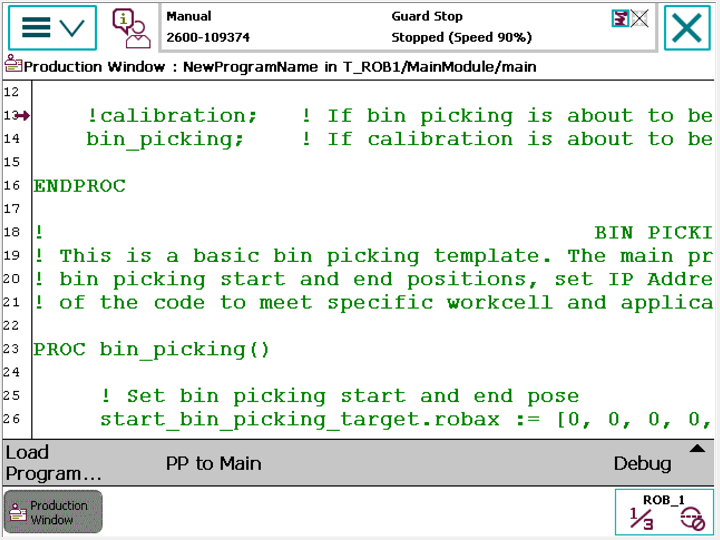
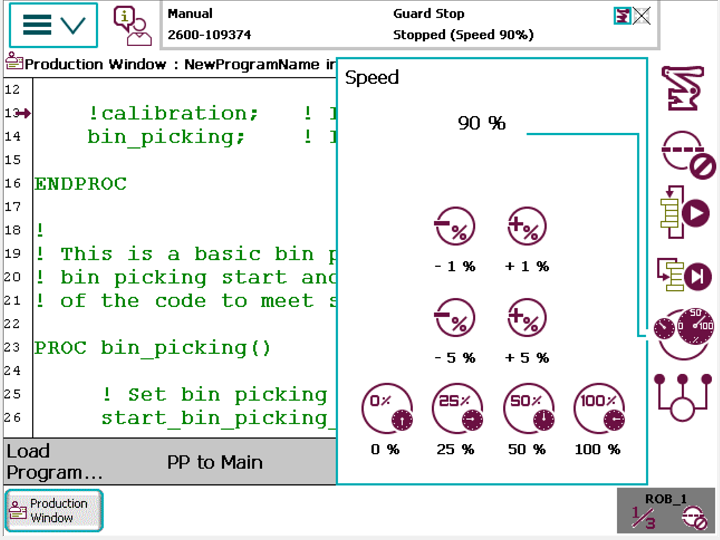
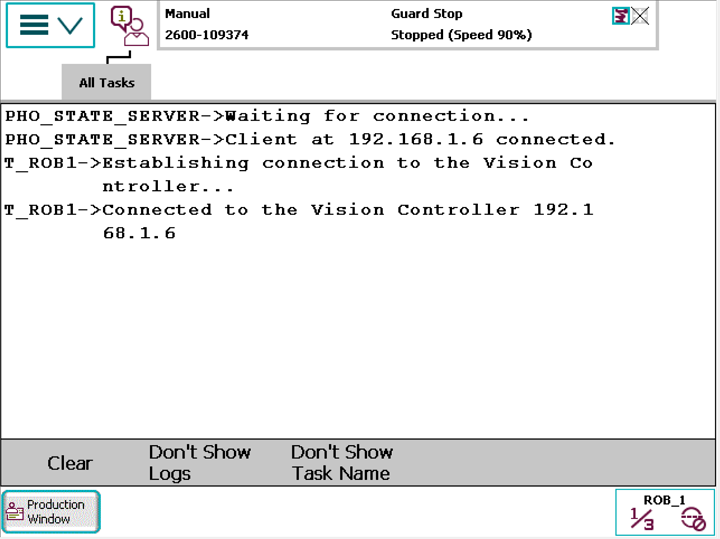
The robot should now start sending requests to the Vision Controller and execute bin picking movements.
NOTE: Ensure that you are ready to halt motion execution immediately. It is strongly recommended to reduce the speed to 10% of the maximum during initial bin picking tests.
5 Migration guide
This chapter will walk you through the process of updating your robot module to newer version. It also documents program flow, API and other changes to help you make all necessary modifications in your current program without encountering any problems.
5.1 BPS 1.1.x -> BPS 1.2.x
NOTE: Migration between these versions ***does require*** robot module update as described in chapter **:ref:`5.6 <integration_guide_for_robots_by_abb_irc5_5.6_Robot_module_update>`** as well as update of the main program according to changes in API.
Changes in API calls as well as new calls are described in the table below:
API call |
Bin Picking Studio 1.1.x |
Bin Picking Studio 1.2.x |
Version compatibility |
|---|---|---|---|
pho_wait_for_server() |
Parameter ‘port’ is required. |
Parameter ‘port’ is optional. When not provided the default value is used (11003). If you need to use specific port value please contact support@photoneo.com to help you with configuring port in Bin Picking Studio. |
Changed. |
pho_request_init() |
Parameter ‘vision_system_id’ does not exist. |
Parameter ‘vision_system_id’ is required. |
Changed. |
pho_request_scan() |
Parameter ‘vision_system_id’ does not exist. |
Parameter ‘vision_system_id’ is required. |
Changed. |
pho_request_trajectory() |
Parameter ‘vision_system_id’ does not exist. |
Parameter ‘vision_system_id’ is required. |
Changed. |
pho_other_req() |
Parameter ‘vision_system_id’ does not exist. |
Parameter ‘vision_system_id’ is required. |
Changed. |
pho_request_send_pick_failed() |
Not available. |
Available. Lower preference of the object because it failed to be picked. It won’t be chosen to be picked in the next cycle. |
New. |
pho_request_calib_start() |
Not available. |
Unsupported. For Photoneo internal use only. |
New. |
pho_request_bin_locator() |
Not available. |
Unsupported. For Photoneo internal use only. |
New. |
pho_request_change_solution() |
Not available. |
Unsupported. For Photoneo internal use only. |
New. |
pho_request_scan_and_traj() |
Deprecated. |
Removed. |
Changed. |
pho_bin_picking() |
Contains API call pho_receive_trajectory(). |
API call pho_receive_trajectory() is not a part of pho_bin_picking(). It must be called directly by the user in MainModule.mod. Calling pho_bin_picking() without previously calling pho_receive_trajectory() results in error. |
Changed. |
pho_receive_trajectory() |
API call pho_request_trajectory() was called inside pho_receive_trajectory() automatically if it was not called by the user in MainModule.mod. |
API call pho_request_trajectory() must be called by the user in MainModule.mod before API call pho_receive_trajectory(). Otherwise error occurs. |
Changed. |
Changes in variables as well as new variables are described in the table below:
Variable |
Bin Picking Studio 1.1.x |
Bin Picking Studio 1.2.x |
Version compatibility |
|---|---|---|---|
pho_tool_point_invariance |
Not available. |
Available. ID of Tool point invariance used for currently picked object. |
New. |
pho_gripping_point_id |
Not available. |
Available. ID of Gripping point used for currently picked object. |
New. |
pho_gripping_point_invariance |
Not available. |
Available. ID of Gripping point invariance used for currently picked object. |
New. |
pho_pick_allowed |
Not available. |
Available. Flag for checking whether bin picking execution is allowed. Used in CustomersDefinitions.mod. |
New. |
PHO_WRONG_BP_CONF |
Not available. |
Available. Value = 255 Occurs when the bin picking configuration is incorrect. After receiving this error check the Bin Picking Studio console for more detailed information. |
New. |
PHO_UNKNOWN_ERR |
Value = 299 |
Value = 99 This error should never occur. If you receive this error please contact support@photoneo.com. |
Changed. |
Other changes are described in the table below:
Subject |
Bin Picking Studio 1.1.x |
Bin Picking Studio 1.2.x |
Version compatibility |
|---|---|---|---|
Default port numbers |
Action Request Server on Vision Controller: 11004 State server on Robot Controller: 11005 User has an option to configure these values. |
Action Request Server on Vision Controller: 11003 State server on Robot Controller: 11004 User is recommended to use these default values - it is not possible to configure port values in Bin Picking Studio by the user. If you need to use specific port value please contact support@photoneo.com to help you with configuring port in Bin Picking Studio. |
Changed. |
Program flow |
Correct program flow in MainModule.mod: pho_request_scan()
pho_wait_for_scan_completion() - optional
pho_request_trajectory() - optional
pho_bin_picking()
|
Correct program flow in MainModule.mod: pho_request_scan()
pho_wait_for_scan_completion() - optional
pho_request_trajectory()
pho_receive_trajectory()
pho_bin_picking()
|
Changed. |
5.2 BPS 1.2.x -> BPS 1.3.x
NOTE: Users are ***advised*** to update robot module as described in chapter **:ref:`5.6 <integration_guide_for_robots_by_abb_irc5_5.6_Robot_module_update>`** when migrating between these versions. The main program, however, does not require any changes.
Changes in API calls as well as new calls are described in the table below:
API call |
Bin Picking Studio 1.2.x |
Bin Picking Studio 1.3.x |
Version compatibility |
|---|---|---|---|
pho_request_change_solution() |
Unsupported. For Photoneo internal use only. |
Supported. Request to change deployed solution. |
Unchanged. |
5.3 BPS 1.3.x -> BPS 1.4.x
NOTE: Migration between these versions ***does require*** robot module update as described in chapter **:ref:`5.6 <integration_guide_for_robots_by_abb_irc5_5.6_Robot_module_update>`**. The main program, however, does not require any changes.
Example program MainModule.mod has been renamed to MainBasic.mod and the procedure binpicking() has been moved directly to the main() function. Calibration procedure reserved for Photoneo internal purposes has been removed. If you used any calibration requests you might encounter error because some of these requests have changed. Please remove or comment out these requests to solve the errors.
5.4 BPS 1.4.x -> BPS 1.5.x
NOTE: Migration between these versions ***does require*** robot module update as described in chapter **:ref:`5.6 <integration_guide_for_robots_by_abb_irc5_5.6_Robot_module_update>`**. The main program, however, does not require any changes.
Changes in variables as well as new variables are described in the table below:
Variable |
Bin Picking Studio 1.4.x |
Bin Picking Studio 1.5.x |
Version compatibility |
|---|---|---|---|
[STRIKEOUT:PHO_EMPTY_SCENE] |
Not available. |
Available. Value = 218 Error indicating that the scene (bin) is empty. Response to failed trajectory request. Note: The error code is not defined in the robot module (PhotoneoCommon.sys) as the other error codes. Please check the value of variable PHO_ERR_CODE using value 218 directly. |
New. |
5.5 BPS 1.5.x -> BPS 1.6.x
NOTE: Migration between these versions ***does require*** robot module update as described in chapter **:ref:`5.6 <integration_guide_for_robots_by_abb_irc5_5.6_Robot_module_update>`**. The main program, however, does not require any changes.
Please read the general Migration guide here. The table below summarizes changes specific to the Robot module for ABB (IRC5).
Variable |
Bin Picking Studio 1.5.x |
Bin Picking Studio 1.6.x |
Version compatibility |
|---|---|---|---|
Error code [204]
PART LOST
|
Unused. |
Removed. |
Changed. |
Error code [205]
COLLISION DETECT
|
Unused. |
Removed. |
Changed. |
5.6 Robot module update
Please follow these steps to update your current robot module to a newer version compatible with the Bin Picking Studio version you are using:
Back up current module CustomerDefinitions.mod. It contains your custom settings as well as gripper action procedures
Remove StateServer task and old modules: PhotoneoCommon.sys, PhotoneoStateServer.mod and CustomerDefinitions.mod and reboot the controller
Load new modules: PhotoneoCommon.sys, PhotoneoStateServer.mod and CustomerDefinitions.mod
Recreate StateServer task and configure it as described in sections 2.2.2 and 2.2.3
Apply your modifications from old CustomerDefinitions.mod to new CustomerDefinitions.mod
Carefully read the API changes in the new version of the robot module and modify your current API calls in your main program accordingly (if necessary)