Info data
Besides the error code, many responses from the vision controller contain additional values. Examples are the gripping point ID of the picked object, the dimensions of a localized object, or the number of objects that are ready for picking. These values are called Info data.
This page describes how Info data are sent since Bin Picking Studio (BPS) 1.12 and Locator Studio (LS) 1.5. It lists the available values, which request returns which value, and where each Robot module stores them.
Contents
1 How Info data are sent
Each value is sent as a separate Info data item. The item has a key - the operation number (oper_num) - which tells the Robot module what the value means. The Robot module reads the key and stores the value in the variable or register assigned to it.

Structure of one Info data item
Because every value carries its own key:
values that do not apply to the deployed solution are simply not sent (for example, object dimensions are only sent by AI-based localization),
the Robot module never has to depend on the position of a value in the response,
new values can be added in future versions without breaking existing Robot modules - unknown keys are ignored.
Note: What happens to Info data that is not sent in a response depends on the Robot module. Some modules keep the earlier value, others reset it (for example, to -1) or return 0. Check the integration guide of your Robot module before you use optional values. Always check the error code of the request first. The values are valid only if the request finished with No error (0).
2 Info data table
The table lists all Info data keys and their unit as sent by the vision controller. Some Robot modules convert the value to a unit that is native to the robot (for example, milliradians to degrees) - see section 4.
Key |
Name |
Unit sent |
Product |
Meaning |
|---|---|---|---|---|
1 |
Tool point invariance |
index |
BPS |
Index of the tool point invariance (symmetry) used for the picked object. |
2 |
Gripping point ID |
index |
BPS |
ID of the gripping point used for the picked object. |
3 |
Gripping point invariance |
index |
BPS |
Index of the gripping point invariance used for the picked object. |
4 |
Dimension X |
mm |
BPS, LS |
Size of the localized object along its X axis. Sent only by solutions that measure the object (AI localization). |
5 |
Dimension Y |
mm |
BPS, LS |
Size of the localized object along its Y axis. Sent together with key 4. |
6 |
Rotation Z |
mrad |
BPS, LS |
Rotation of the localized object around Z. Sent together with key 4. |
7 |
Neural network label |
integer |
BPS, LS |
Class assigned to the object by the neural network. See Neural network labels. |
8 |
Max Z height |
mm |
LS |
Height of the highest point of the localized layer. |
9 |
Tilt |
mrad |
LS |
Tilt of the localized layer. |
10 |
Calibration accuracy |
µm |
BPS, LS |
Accuracy of the calibration that was just saved. |
11 |
Running solution ID |
integer |
BPS, LS |
ID of the solution that is currently running in deployment. |
12 |
Number of localized objects |
integer |
BPS, LS |
Number of objects localized after the last scan. |
13 |
Number of ready objects |
integer |
BPS, LS |
BPS: number of objects with a successfully planned trajectory. LS: number of objects ready to be sent. |
14 |
Processing state |
0 / 1 |
BPS, LS |
1 = localization or path planning is still running, 0 = processing has finished. |
Note: Currently, only LS sends keys 8 and 9. Robot modules for BPS already reserve a variable for them, so that the data can be added in a future version without a change to the Robot module.
3 Which request returns which Info data
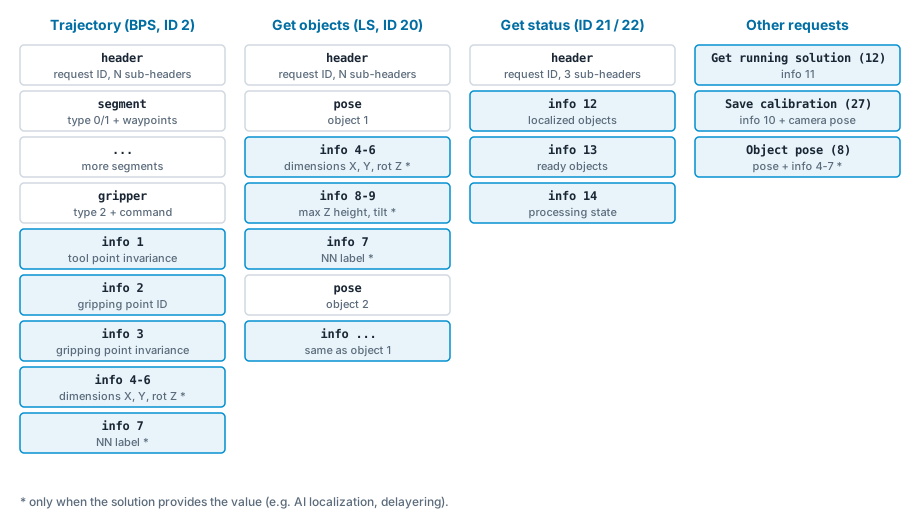
Response layout of the requests that return Info data
Request |
Keys |
Notes |
|---|---|---|
Trajectory request (BPS, ID 2), received by Receive trajectory |
1, 2, 3, (4, 5, 6), (7) |
Keys 1-3 are always sent. Keys 4-6 and 7 are sent only when the solution provides them. |
Object pose request (BPS, ID 8) |
(4, 5, 6), (7) |
Sent after the object pose, only when the solution provides them. |
Get objects request (LS, ID 20) |
(4, 5, 6), (8, 9), (7) |
Sent after each object pose, so they belong to the object received just before them. |
Get vision system status request (BPS ID 21, LS ID 22) |
12, 13, 14 |
Always all three. |
Get running solution request (ID 12) |
11 |
|
10 |
Sent before the calibration result (camera pose). |
4 Where the Robot module stores Info data
Every Robot module stores Info data in its own variables or registers. Select your robot brand below. The unit in the tables is the unit of the value in the robot variable. If it differs from the unit sent, the Robot module converts the value.
A dash (-) means the value is not used by that product.
ABB IRC5 and OmniCore use the same variables. They are declared in PHO_BPS_BASE.sys / PHO_LS_BASE.sys (.sysx on OmniCore).
Key |
BPS 1.12 |
LS 1.5 |
Unit in robot |
|---|---|---|---|
1 |
|
- |
index |
2 |
|
- |
index |
3 |
|
- |
index |
4 |
|
|
mm |
5 |
|
|
mm |
6 |
|
|
deg |
7 |
|
|
integer |
8 |
|
|
mm |
9 |
|
|
deg (LS) |
10 |
|
|
µm |
11 |
|
|
integer |
12 |
|
|
integer |
13 |
|
|
integer |
14 |
|
|
0 / 1 |
In LS, {n} is the index of the object in the list returned by the Get objects request.
The variables are declared in prjglobal.erd. Estun keeps all values in the unit in which they were sent.
Key |
BPS 1.12 |
LS 1.5 |
Unit in robot |
|---|---|---|---|
1 |
|
- |
index |
2 |
|
- |
index |
3 |
|
- |
index |
4 |
|
|
mm |
5 |
|
|
mm |
6 |
|
|
mrad |
7 |
|
|
integer |
8 |
|
|
mm |
9 |
|
|
mrad |
10 |
|
|
µm |
11 |
|
|
integer |
12 |
|
|
integer |
13 |
|
|
integer |
14 |
|
|
0 / 1 |
In LS, the object values (keys 4-9) hold the values of the last object received.
FANUC stores Info data in numeric registers. LS additionally appends the object values (keys 4-9) to a string register for each received object. The text next to each register is the register comment that the Robot module writes on the teach pendant.
Key |
BPS 1.12 |
LS 1.5 |
Unit in robot |
|---|---|---|---|
1 |
|
- |
index |
2 |
|
- |
index |
3 |
|
- |
index |
4 |
|
|
mm |
5 |
|
|
mm |
6 |
|
|
deg |
7 |
|
|
integer |
8 |
|
|
mm |
9 |
|
|
deg |
10 |
|
|
mm |
11 |
|
|
integer |
12 |
|
|
integer |
13 |
|
|
integer |
14 |
|
|
0 / 1 |
Note: In LS 1.5, the comments of R[28] and R[29] do not match their content. R[28] holds the max Z height (key 8) and R[29] holds the tilt (key 9).
The Kassow CBun exposes Info data as outputs of the CBun commands and through getter functions.
Key |
BPS 1.12 |
LS 1.5 |
|---|---|---|
1-3 |
|
outputs of |
4-6 |
|
outputs of |
7-9 |
- |
outputs of |
10 |
Calibration Accuracy output of |
Calibration Accuracy output of |
11 |
|
|
12-14 |
outputs of |
outputs of |
The values are passed in the unit in which they were sent (dimensions in mm, angles in mrad, calibration accuracy in µm).
Variables are declared in photoneo_common.pg / photoneo_locator.pg.
Key |
BPS 1.12 |
LS 1.5 |
Unit in robot |
|---|---|---|---|
1 |
|
- |
index |
2 |
|
- |
index |
3 |
|
- |
index |
4 |
|
|
mm |
5 |
|
|
mm |
6 |
|
|
rad |
7 |
|
|
integer |
8 |
|
|
mm |
9 |
|
|
rad |
10 |
|
|
µm |
11 |
|
|
integer |
12 |
|
|
integer |
13 |
|
|
integer |
14 |
|
|
0 / 1 |
Global variables are declared in pho_common.dat.
Key |
BPS 1.12 |
LS 1.5 |
Unit in robot |
|---|---|---|---|
1 |
|
- |
index |
2 |
|
- |
index |
3 |
|
- |
index |
4 |
|
|
mm |
5 |
|
|
mm |
6 |
|
|
deg |
7 |
|
|
integer |
8 |
|
|
mm |
9 |
|
|
deg (LS) |
10 |
|
|
µm |
11 |
|
|
integer |
12 |
|
|
integer |
13 |
|
|
integer |
14 |
|
|
0 / 1 |
Global variables are declared in photoneo_main_bps.script / photoneo_main_ls.script.
Key |
BPS 1.12 |
LS 1.5 |
Unit in robot |
|---|---|---|---|
1 |
|
- |
index |
2 |
|
- |
index |
3 |
|
- |
index |
4 |
|
|
mm |
5 |
|
|
mm |
6 |
|
|
BPS: rad, LS: deg |
7 |
|
|
integer |
8 |
|
|
mm |
9 |
|
|
BPS: rad, LS: deg |
10 |
|
|
mm |
11 |
|
|
integer |
12 |
|
|
integer |
13 |
|
|
integer |
14 |
|
|
0 / 1 |
In LS, the object values (keys 4-9) hold the values of the last object received.
PolyScope 5 (CB-Series, e-Series) and PolyScope X use the same variable names. They are declared in photoneo_common.script / photoneo_locator.script (*_X.script on PolyScope X).
Key |
BPS 1.12 |
LS 1.5 |
Unit in robot |
|---|---|---|---|
1 |
|
- |
index |
2 |
|
- |
index |
3 |
|
- |
index |
4 |
|
|
mm |
5 |
|
|
mm |
6 |
|
|
BPS: deg. LS: rad (PolyScope 5), deg (PolyScope X) |
7 |
|
|
integer |
8 |
|
|
mm |
9 |
|
|
LS: rad (PolyScope 5), deg (PolyScope X) |
10 |
|
|
µm |
11 |
|
|
integer |
12 |
|
|
integer |
13 |
|
|
integer |
14 |
|
|
0 / 1 |
In LS, [n] is the index of the object in pho_object_poses (starting from 0).
Yaskawa stores Info data in integer variables (I). The names shown on the teach pendant are loaded from VARNAME.DAT. The text next to each variable is its name from VARNAME.DAT.
Key |
BPS 1.12 |
LS 1.5 |
Unit in robot |
|---|---|---|---|
1 |
|
- |
index |
2 |
|
- |
index |
3 |
|
- |
index |
4 |
|
|
mm |
5 |
|
|
mm |
6 |
|
|
deg (whole degrees) |
7 |
|
|
integer |
8 |
|
|
mm |
9 |
|
|
mrad |
10 |
|
|
µm |
11 |
|
|
integer |
12 |
|
|
integer |
13 |
|
|
integer |
14 |
|
|
0 / 1 |
Note: Robot modules for Doosan, Hyundai Robotics, KUKA LBR iiwa and Stäubli are documented for older versions only. See the integration guide for the brand.
5 Differences to older versions
Robot modules older than BPS 1.12 / LS 1.5 receive Info data in the previous format. The vision controller detects the version from the brand ID that the Robot module sends after it connects.
Subject |
BPS ≤ 1.11 / LS ≤ 1.4 |
BPS 1.12 / LS 1.5 |
|---|---|---|
Identification of a value |
By its position in the response. |
By its key ( |
Get vision system status |
One Info data item with three values. |
Three Info data items (keys 12, 13, 14). |
Object dimensions (LS) |
Two Info data items per object: (X, Y, rotation Z) and (max Z height, tilt). |
One Info data item per value (keys 4, 5, 6, 8, 9). |
Neural network label |
Not sent. |
Key 7. |
In most cases, existing robot programs do not need any change - you only have to update the Robot module. A few Robot modules also renamed or moved variables (for example Yaskawa LS and Kassow). For details, see the BPS migration guide and the LS migration guide.