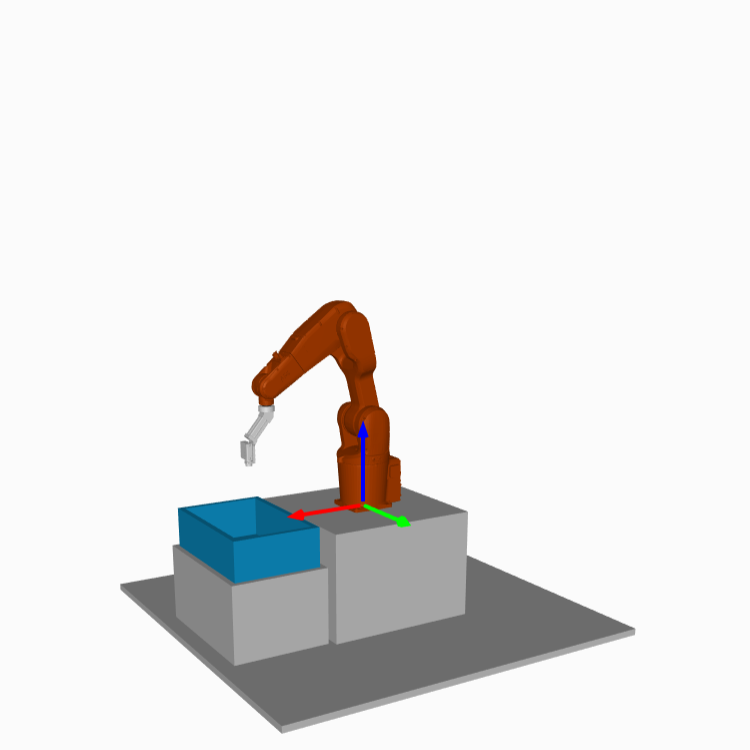
Robot mount orientation
Robots in production applications are not always floor-mounted. Robot orientation can be dependent on the nature of the tasks it executes or on the limitations of its working environment.
A new Bin Picking Studio (BPS) solution is configured for a floor-mounted robot by default. We support robots mounted in any orientation, however. In this tutorial, we will provide three examples of how to set BPS up correctly with the robot in the most common mount positions - floor, wall, and ceiling.
Mount position - - - Bin Picking Studio settings |
Floor |
Wall |
Ceiling |
Environment Model your environment correctly. Rotate the scene so it corresponds to the reality. Notice how the axes of robot space are oriented. Robot space has its origin in the robot’s base and its X, Y, Z axes each correspond to the red, green, and blue arrow, respectively.
Based on robot space orientation, several settings need to be adjusted.
Note: Robots of all supported robotic brands except for Kawsasaki use the X axis as the forward direction. Kawasaki robots use the Y axis as the forward direction. |
|
||
Gripper angle - Reference vector This vector is defined in robot space and points upwards in the real world. |
X: 0 Y: 0 Z: 1 Robot-space vector [0,0,1] points upwards. |
X: -1 Y: 0 Z: 0 Robot-space vector [-1,0,0] points upwards. |
X: 0 Y: 0 Z: -1 Robot-space vector [0,0,-1] points upwards. |
Picking priority - Picking direction vector This vector is defined in robot space and it specifies the direction of picking. Normally, we want the objects on the surface to be picked first so this vector should generally point downwards. |
X: 0 Y: 0 Z: -1 Robot-space vector [0,0,-1] points top-to-bottom, which is normally the direction in which we want to pick objects. |
X: 1 Y: 0 Z: 0 Robot-space vector [1,0,0] points top-to-bottom, which is normally the direction in which we want to pick objects. |
X: 0 Y: 0 Z: 1 Robot-space vector [0,0,1] points top-to-bottom, which is normally the direction in which we want to pick objects. |
Grasping method - Picking path stages Relative type - Origin of relative offset is set to Robot / Start / End Robot-space orientation affects the definition of relative waypoints specified in robot space. |
The Deapproach waypoint is, by default, 100 mm above the gripping point defined in Robot space. “Above” is defined as follows: X: 0
Y: 0
Z: 100
Beware of the robot space orientation when defining the offsets. |
The Deapproach waypoint is, by default, 100 mm above the gripping point defined in Robot space. “Above” is defined as follows: X: -100
Y: 0
Z: 0
Beware of the robot space orientation when defining the offsets. |
The Deapproach waypoint is, by default, 100 mm above the gripping point defined in Robot space. “Above” is defined as follows: X: 0
Y: 0
Z: -100
Beware of the robot space orientation when defining the offsets. |
Grasping method - Picking path stages Relative type - Origin of relative offset is set to Fixed plane The Relative offset value specifies the distance measured from the robot base origin (in robot space) to where the plane is located. |
Supported. Beware of the chosen fixed plane (XY, XZ, YZ) and the direction of the movement. |
Supported. Beware of the chosen fixed plane (XY, XZ, YZ) and the direction of the movement. |
Supported. Beware of the chosen fixed plane (XY, XZ, YZ) and the direction of the movement. |
Grasping method - Picking path stages Fixed type Robot space orientation affects the definition of fixed waypoints because they are defined in robot space. |
Beware of the robot space orientation when defining the offsets. |
Beware of the robot space orientation when defining the offsets. |
Beware of the robot space orientation when defining the offsets. |